2026 JAMB UTME CBT Software for Offline Practice
Quick Download Links & Contact
Download the MySchoolGist CBT practice software for your PC or mobile device, or reach out for quick support.
Windows 10 and Above
PC version of the MySchoolGist CBT practice software for UTME.
Android & iOS Apps
Practice for UTME on your smartphone anywhere, anytime.
- For Android: Download the Android app
- For iOS: Download the iOS app
Contact & Support
- Email: admin@myschoolgist.com
- Phone: 0915 526 9270
- WhatsApp: Chat for quick help Replies are usually fast.
Summary
JAMB UTME needs book knowledge and CBT screen skill. JAMB CBT Software practice help students feel calmer on the screen, move faster, and waste less time.
- Practise with a CBT screen that looks like UTME, with a timer and the same buttons
- Use Study Mode to learn slowly with answers and reasons
- Use Exam Mode to test speed, then review mistakes
- Set it up once, then it works offline after setup
- Try the free version first, then unlock full access for ₦3,000 one-time payment
- Activate by card inside the app, or pay by transfer and use the 12-digit code
Getting ready for JAMB UTME can feel hard. A student may begin strong, then focus slips. One phone alert shows up, and time is gone. Some learners also fear the computer screen in the exam hall. That fear can slow reading and make thinking messy.
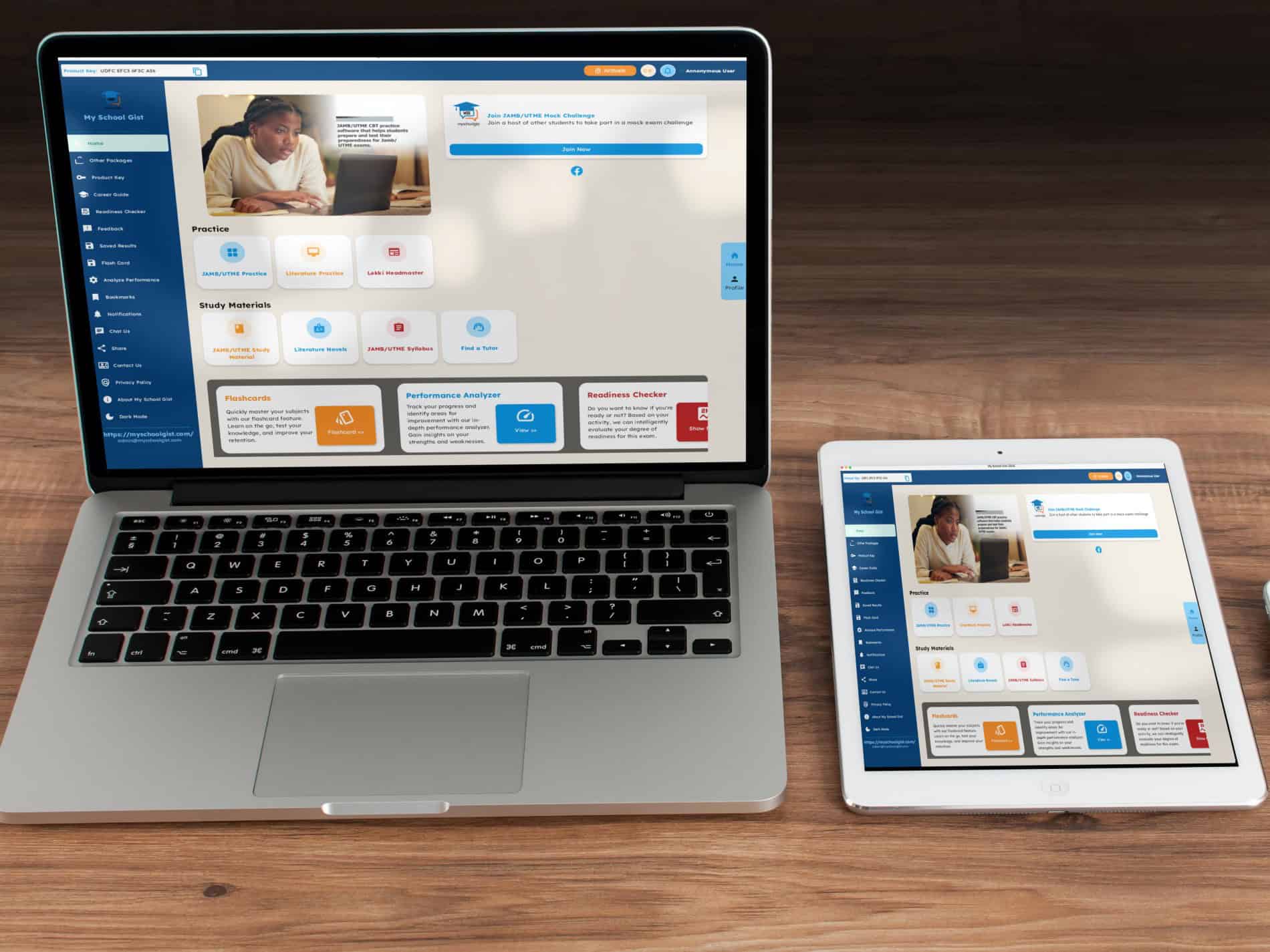
This is where JAMB CBT Software practice can help. MySchoolGist JAMB CBT Software gives a screen that looks like the real JAMB exam. It has a timer and the same style of buttons. After setup, it works without internet, so study time stays steady.
In some homes, the change is clear. One of my younger sisters used it and later met her OAU cut-off mark with a smile. Nothing strange happened. It was practice, done often, and better habits.
Why JAMB CBT Software practice matters
JAMB is not just about knowing the topic. It is also about using the CBT system with ease. For some students, the first CBT screen they see is on the real exam day. Their heart may beat fast. They may click the wrong place. They may waste time looking for the next button.
When a student uses MySchoolGist JAMB CBT Software again and again, the screen stops feeling new. They learn where to click. They learn how to move between questions. They get used to the timer. Calm grows, and speed grows too.
The software does not claim to give real leaked JAMB questions. It is for practice and confidence. Any platform that promises leaked live questions is a risk and can mislead students.
Who can use MySchoolGist JAMB CBT Software
This tool can fit different people:
- Students writing JAMB for the first time
- Students who want to raise an old score
- Parents who want a clear study tool at home
- Café owners who run CBT practice for candidates
One device can serve many users. A student can practise Government, while a sibling practises Literature, and a cousin practises Biology. Each person can stay on their own subjects, so it doesn’t turn into noise.
Offline setup and simple use
MySchoolGist JAMB CBT Software is installed once. After that, it can work offline. That means no monthly payment for access and no worry about weak network after setup.
A student can practise in many places:
- At home
- At school
- In a café
- In a village setting
- Under a quiet tree, if that is the best spot for reading
If the student can use a phone or laptop, they can follow the steps in the app. It’s not hard to pick up, even for someone that is slow at first.
Two ways to practise: Study Mode and Exam Mode
The software supports two main practice styles.
Study Mode: slow learning, step by step
Study Mode is for learning without rushing. A student reads a question, picks an answer, then checks the correct answer and the reason. It helps the topic sit in the head, little by little.
Exam Mode: timed practice like UTME
Exam Mode feels like the real UTME. The timer runs, and the student answers under time. After the test, the student can review mistakes, see the correct answers, and read the reasons. Each try can bring a better score, if the student keeps at it.
What is inside the software
MySchoolGist JAMB CBT Software includes tools that many students want during UTME prep:
- More than 30,000 real JAMB past questions (see MySchoolGist free JAMB past questions)
- Clear answers with simple explanations
- Offline access after setup
- A CBT layout that looks like the exam screen
- A built-in calculator
- A JAMB syllabus for each subject (use the MySchoolGist JAMB syllabus pages)
- Literature summaries and notes
- One payment for lifetime use
- Support for many users on one device
A student who is not confident with computers can still learn it fast. The buttons and steps match what the exam screen shows, so it feels familiar after a while.
Cost and value for learners
The software has a free version to test first. After trying it, a student can unlock full access for ₦3,000. It is a one-time payment.
Some printed past question books can cost more when a student buys many subjects. This software covers many subjects in one place and can be used again and again. For a family with more than one child, the one-device, many-users option can help.
How to activate the full version
MySchoolGist JAMB CBT Software lists two payment options inside the app.
Option 1: Card payment
- Open the software
- Click Activate
- Choose Card Payment
- Follow the steps to unlock access
Option 2: Bank transfer
- Send ₦3,000 to the bank details shown inside the software
- Send the Name and Product Key by WhatsApp or SMS to 0915 526 9270
- A 12-digit code is sent back
- Enter the code and click Activate
What real users say
Some users have shared short feedback:
- “I use it in my café in Lagos. It works well on all 50 computers.” — Joel, Lagos
- “It teaches in a way that makes sense to me.” — Abayomi, Abeokuta
- “They reply fast, they also render good service.” — Becky, Lagos
- “The customer service was very professional and helpful.” — Kikelomo, Osun
A simple pattern shows up in these comments: steady practice and clear support can make exam prep feel less stressful.
Literature can feel easier with the right notes
Literature can confuse students, mainly when the story feels long or the meaning is not clear. The software includes summaries and practice that can guide the student.
For learners working on set texts, MySchoolGist also shares support materials like The Lekki Headmaster questions and answers. Short notes and focused questions can help a student remember key parts of a book.
A simple weekly plan a student can follow
A plan helps students stay steady. Here is one simple weekly guide:
- Monday: Study Mode, two subjects, 30 to 40 questions
- Tuesday: Literature and English practice
- Wednesday: Exam Mode, full test
- Thursday: Review mistakes and read the reasons
- Friday: Half test in two subjects
- Saturday: Read the syllabus and revise weak topics
- Sunday: Rest or light revision
This plan keeps learning regular. It mixes reading, testing, and review, so the student is not doing one thing only.
Common questions about JAMB CBT Software
Does it leak real JAMB questions?
No. It is for practice. It helps the student learn the CBT style and build confidence.
What if the network is bad?
After setup, it works offline. A poor network should not stop daily practice.
What if a student is not good with computers?
The layout is simple. Repeated use builds computer comfort, even if the first days feel rough.
Can many people use one device?
Yes. One device can serve many users, across different subjects.
Can a student start late?
A late start can still help. Even two weeks of steady practice can improve speed and reduce fear.
Tips that can help a student score better
Small habits can add up:
- Practise at the same time of day as the exam time
- Read the reason for each correct answer during review
- Spend more time on weak topics, not just favourite ones
- Write down repeated mistakes and go back to them
- Sit and practise like it is the exam hall
- Track scores and aim to beat the last score
Final note
The main aim is calm speed. When the student stays calm, they read better and answer faster.
MySchoolGist JAMB CBT Software is not a promise of miracles. It is a practice tool. It helps students get used to the CBT screen, manage time, and learn from mistakes. With steady use, a student can walk into the exam day with more confidence and better control.